Difference between revisions of "WW-THERM"
Jump to navigation
Jump to search
(New page: WW-THERM) |
(Marked this version for translation) |
||
| Line 1: | Line 1: | ||
<languages/> | <languages/> | ||
<translate> | <translate> | ||
| + | <!--T:1--> | ||
{{Infobox module | {{Infobox module | ||
| name = WW-THERM | | name = WW-THERM | ||
| Line 8: | Line 9: | ||
}} | }} | ||
| − | ==WALL THERMOSTAT== | + | ==WALL THERMOSTAT== <!--T:2--> |
WW-THERM is a wall thermostat with a screen for thermostat control and 4 touch buttons. It is connected to the CAN bus. | WW-THERM is a wall thermostat with a screen for thermostat control and 4 touch buttons. It is connected to the CAN bus. | ||
| + | <!--T:3--> | ||
* Screen for thermostat control (set temperature, mode). | * Screen for thermostat control (set temperature, mode). | ||
* 4 touch buttons for scenarios, curtains and other items. | * 4 touch buttons for scenarios, curtains and other items. | ||
| Line 19: | Line 21: | ||
* Colors: black, gold, white. | * Colors: black, gold, white. | ||
| − | ==Module parameters== | + | ==Module parameters== <!--T:4--> |
{{ Mp | {{ Mp | ||
| ctrlparams = Temperature, fancoil | | ctrlparams = Temperature, fancoil | ||
| Line 26: | Line 28: | ||
}} | }} | ||
| − | ==Items== | + | ==Items== <!--T:5--> |
{|class="wikitable" | {|class="wikitable" | ||
!SUBID!!Type!!Description | !SUBID!!Type!!Description | ||
| Line 37: | Line 39: | ||
|} | |} | ||
| − | ==HW settings== | + | ==HW settings== <!--T:6--> |
{|class="wikitable" | {|class="wikitable" | ||
|- | |- | ||
| Line 58: | Line 60: | ||
|} | |} | ||
| + | <!--T:7--> | ||
Example: | Example: | ||
<syntaxhighlight lang="xml" line> | <syntaxhighlight lang="xml" line> | ||
Latest revision as of 12:56, 5 November 2026
| WW-THERM | |||||
|---|---|---|---|---|---|
 | |||||
| |||||
WALL THERMOSTAT
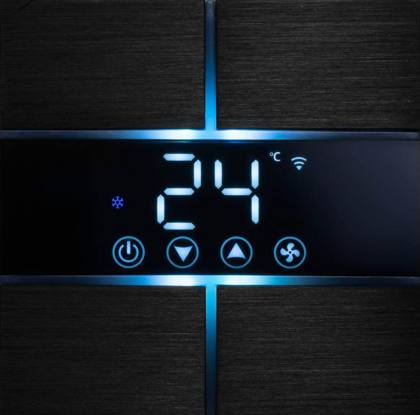
WW-THERM is a wall thermostat with a screen for thermostat control and 4 touch buttons. It is connected to the CAN bus.
- Screen for thermostat control (set temperature, mode).
- 4 touch buttons for scenarios, curtains and other items.
- Built-in temperature sensor.
- Input for an external temperature sensor (for example, a floor probe).
- 4 relays to control a fancoil.
- RGB LED backlight with adjustable color and brightness.
- Colors: black, gold, white.
Module parameters
| Parameter name | Value |
|---|---|
| Control parameters | Temperature, fancoil |
| Bus type | CAN |
| Equipment installation type | Wall |
Items
| SUBID | Type | Description |
|---|---|---|
| 30 | temperature-sensor | Built-in temperature sensor |
| 31 | temperature-sensor | External temperature sensor |
| 98 | temperature-sensor (system) | HW settings of the module |
HW settings
| Name | Type, range | SUBID | Default | Description |
|---|---|---|---|---|
| center | char (r, g, b, p, y, c, w) | 98 | Backlight color: r – red, g – green, b – blue, p – purple, y – yellow, c – cyan, w – white. Example:
1hw="center='g'"
| |
| bright | int (0…250) | 98 | Backlight brightness. Example:
1hw="bright='120'"
| |
| offset | float (-99…99, step 0.1) | 30, 31 | 0 | Offset of the sensor value. Example:
1hw="offset='-1.5'"
|
Example:
1<item addr="512:30" cfgid="200" name="Temperature" type="temperature-sensor" hw="offset='-1.5'"/>
2<item addr="512:31" cfgid="200" name="Floor temperature" type="temperature-sensor"/>
3<item addr="512:98" cfgid="200" name="Temperature" system="yes" type="temperature-sensor" hw="center='g' bright='120'"/>